Honestly, the redesign was nice, but the inquiry form is what changed our day-to-day. It collects collection day, order quantity and item selection up front, so the back-and-forth we used to do by reply has largely gone. It has quietly removed the slowest step in our intake.
For US cafes, coffee shops and bakeries
A cafe website that knows what time it is
A fully managed, fast website for cafes, coffee shops and bakeries: a menu that reads right at 7am and at 7pm, live in 7 days, 90+ PageSpeed, weekly updates and hosting included, from one monthly plan.
$117 a monthLive in 7 days90+ PageSpeed$647 build fee, after launch

Counter view7:42 AM
Morning menu Drip, house blendx2
Almond croissantx1
Oat milk lattex1
Example orderFictional data
Coffee shops Roasters Bakeries Pastry shops Dessert cafes Breakfast and bagel shops Cafe-bookstores Drive-thru stands Tea and boba shops
What you can hold us to
- $647 build fee invoiced only after you approve the live site
- 90+ PageSpeed on mobile, fixed at no charge if our work drops it
- Domain registered in your name, hosting included
- No long contract: cancel by email with 2 business days notice
- Live in 7 days on Morning Shift
Honestly, the redesign was nice, but the inquiry form is what changed our day-to-day. It collects collection day, order quantity and item selection up front, so the back-and-forth we used to do by reply has largely gone. It has quietly removed the slowest step in our intake.
My first check was simple: open the bakery preorders page on a phone and try to get in touch. The essentials are within the first screen, with an obvious way to inquire. Staff can now text a single link mid-call instead of narrating the menu.
They asked to see the questions customers genuinely ask us about bakery preorders, which I respected. Each answer was reviewed by our own staff, so the page sounds like us rather than a copywriter. I now share a link instead of digging through the outbox.
Most cafe sites are built for one hour of the day
The rest of the day gets whatever is left over. That is the gap this site is built to close.
Every price, hour and menu item shown across this site is fictional example data.
- The menuBefore:One long list, shown the same at 7am and at 7pm.After:A menu that leads with what you actually sell right now.
- The homepageBefore:A stock photo of a latte and a paragraph of brand story.After:Hours, location and today's daypart menu, visible without scrolling.
- SpeedBefore:A page builder loaded with plugins, slow on a phone.After:Custom-coded pages served from the edge, 90+ PageSpeed.
- UpdatesBefore:A seasonal item still listed months after it sold out.After:Weekly management and revisions turned around in working days.
What does an out-of-date cafe website actually cost?
It rarely costs anything you can see on a receipt. It costs the customers, orders and hours that quietly go somewhere else.
The walk-in who kept walking
Someone on the sidewalk checks your hours on a phone, the page stalls or shows last season's menu, and they go to the chain on the corner instead. You never learn it happened.
The cake order that went elsewhere
A custom cake or catering request lands in an inbox nobody opens until after close. By the time you reply, they have booked the bakery that answered first.
Paid clicks that bounce
If you run ads or boost posts, every visitor who leaves before a slow page loads is a click you paid for and lost. Google also scores landing page experience when it prices ads.
The call during the rush
The phone rings when the bar is three deep. Nobody can pick up, and the question that would have been a group order becomes a voicemail nobody returns.
Your evenings
Every "quick" website fix done yourself after close is an hour not spent on the bake, the books or your own life. A page builder always has one more setting to learn.
Searches you never show up for
"Gluten-free bakery near me", "coffee shop open early", "boba near campus". A site made of photos and a PDF menu gives search engines and AI assistants nothing to read.
The daypart dial
One shop, three very different hours. The site is built to know which one it is in.
Morning 6:30 to 11:00, example hours for illustration
The rush the whole shop is built around
The homepage and menu lead with what actually moves at the counter before 11: drip, espresso, the case at its fullest. Fast pages matter most here, when a visitor is standing outside deciding in seconds.
Afternoon 11:00 to 16:00, example hours for illustration
The slower stretch that still has to carry the day
A quieter crowd searches differently: wifi, seating, a lighter menu. The site surfaces what fits this stretch, from workspace details to a lunch or light-bites section if you carry one.
Evening 16:00 to 20:00, example hours for illustration
The close, or a second life after dark
Some shops wind down; others lean into dessert, wine or a later crowd. The menu panel and hero imagery are honest about which one you actually run.
7 daysTo launch on Morning Shift
90+PageSpeed, guaranteed
5Revisions included every month
3Articles a week on Open to Close
Everything a fast, managed site needs, built for the counter
Every plan carries the website, hosting, weekly care and articles. The AI Engine adds a receptionist, a chat and text replies; the Content Engine adds more articles plus social posts and reels.
A menu that switches with the day
One page that shows the morning menu at 7am and the evening case at 6pm, automatically.
Morning Shift · Full Shift · Open to Close
Pages that open before the espresso pulls
Custom-coded pages served from the edge, 90+ PageSpeed guaranteed.
Morning Shift · Full Shift · Open to Close
An AI receptionist for the calls you cannot pick up
Answers the phone when the bar is three deep, takes the details and books what needs booking.
Full Shift · Open to Close
An AI chat on your site that answers before they call
A chat window on every page that answers routine questions and captures catering and custom-order inquiries.
Full Shift · Open to Close
Researched articles, written for the neighborhood you serve
2 to 3 original articles a week, written for your area and your kind of counter.
Morning Shift · Full Shift · Open to Close
SEO, AEO and GEO built into every page
Technical and on-page SEO, answer-first FAQ content, structured data and an llms.txt, so search engines and AI assistants can read you.
Morning Shift · Full Shift · Open to Close
Inquiries land where you actually check
Catering requests, private events and general questions route straight into your CRM.
Morning Shift · Full Shift · Open to Close
Hosting and one domain, both included
Cloudflare hosting with SSL, CDN and DDoS protection, plus a free domain in your name.
Morning Shift · Full Shift · Open to Close
What is in each plan
Every feature, what it fixes at the counter, what you do (usually nothing) and which plan carries it. Plans from $117 a month.
Morning Shift $117/ monthFull Shift $247/ month + usageOpen to Close $597/ month
The website
- A menu that switches with the day
Solves: A single menu page shows the morning pastries at 6pm and the evening case at 7am, so people turn up for things that are gone.
Your part: Send your three lists and the times each daypart starts. After that, send changes when the menu changes.
- Morning Shiftincluded
- Full Shiftincluded
- Open to Closeincluded
- Pages that open before the espresso pulls
Solves: A slow page loses the person standing outside on a phone, and on paid ads it loses a click you already paid for.
Your part: Nothing. Speed is built in and checked by us.
- Morning Shiftincluded
- Full Shiftincluded
- Open to Closeincluded
- Online ordering, without building an ordering system
Solves: Visitors hunt for an Order button that is not there, or land on an old delivery link.
Your part: Tell us which pickup and delivery platforms you use and send new links when they change.
- Morning Shiftincluded
- Full Shiftincluded
- Open to Closeincluded
- A page for every location you run
Solves: One shared locations list means each shop competes with its sister shops and drivers go to the wrong one.
Your part: Send each location's address, hours and any menu differences.
- Morning Shiftincluded
- Full Shiftincluded
- Open to Closeincluded
The AI Engine
- The AI Engine, for answering the question before it is asked
Solves: Routine questions (open now? oat milk? parking?) interrupt the bar and go unanswered after hours.
Your part: Review the answers and scripts before launch, then tell us when hours or policies change.
- Morning Shiftnot included
- Full Shiftincluded
- Open to Closeincluded
- An AI receptionist for the calls you cannot pick up
Solves: The phone rings during the 8am rush or after close, nobody can answer, and a catering order or a group booking goes to the next shop on the list.
Your part: Review the receptionist script before launch. After that, tell us when hours, policies or booking rules change.
- Morning Shiftnot included
- Full Shiftincluded
- Open to Closeincluded
- An AI chat on your site that answers before they call
Solves: Visitors have one quick question (are you open now, is there seating, do you do gluten-free) and leave when nobody answers a contact form until tomorrow.
Your part: Approve the answers before launch. Nothing day to day.
- Morning Shiftnot included
- Full Shiftincluded
- Open to Closeincluded
- Text message replies, with carrier registration handled
Solves: Customers text the number on the sign. Replies wait until the close, and business texting without carrier registration gets filtered or blocked.
Your part: Approve the scripts and keep your own consent and opt-out records for texts you send. Carrier fees are passed through at cost.
- Morning Shiftnot included
- Full Shiftincluded
- Open to Closeincluded
Content and search
- Researched articles, written for the neighborhood you serve
Solves: Nobody has time to write blog posts between the bake and the close, so the site never shows up for specific local searches.
Your part: Nothing required. Suggest a topic whenever you like.
- Morning Shiftincluded
- Full Shiftincluded
- Open to Closeincluded
- SEO, AEO and GEO built into every page
Solves: Someone searches "bakery open early near me" or asks an AI assistant for a good coffee shop nearby, and a site built from photos and PDFs gives neither anything to read.
Your part: Nothing. Tell us about new locations, neighborhoods you serve and anything you want to be found for.
- Morning Shiftincluded
- Full Shiftincluded
- Open to Closeincluded
- Social posts and reels, from the Content Engine
Solves: The feed goes quiet for weeks because nobody has time to post between shifts, and the seasonal drink launches with one photo.
Your part: Send photos or clips when you have them. Approve the plan for the week if you want to.
- Morning Shiftnot included
- Full Shiftnot included
- Open to Closeincluded
Hosting, care and your rights
- Weekly updates, so the site keeps working after launch
Solves: Sites drift out of date within weeks: holiday hours, sold-out seasonal items, a broken link nobody owns.
Your part: Send changes as revisions from your client portal or by email. The weekly check happens without you.
- Morning Shiftincluded
- Full Shiftincluded
- Open to Closeincluded
- Hosting and one domain, both included
Solves: Separate hosting, SSL and domain bills, renewals nobody remembers, and a domain registered in someone else's name.
Your part: Nothing, or give us access to the domain you already own so we can point it.
- Morning Shiftincluded
- Full Shiftincluded
- Open to Closeincluded
- Inquiries land where you actually check
Solves: Catering and custom-cake requests sit unread in an inbox nobody checks after the morning rush.
Your part: Tell us where each type of inquiry should land during onboarding.
- Morning Shiftincluded
- Full Shiftincluded
- Open to Closeincluded
- The policy and accessibility pages a business site needs
Solves: Most small cafe sites have no privacy policy, load tracking before anyone agrees to it, and have never been checked with a keyboard or a screen reader.
Your part: Confirm the business details in each policy. Have your own advisor review them if you want legal sign-off.
- Morning Shiftincluded
- Full Shiftincluded
- Open to Closeincluded
- Moving in from your old site, and moving out if you ever leave
Solves: A new site that breaks every old link loses the search ranking and shared links the shop spent years earning, and a provider that keeps your content hostage makes leaving expensive.
Your part: Send your current web address and, if you have it, access to where it is hosted.
- Morning Shiftincluded
- Full Shiftincluded
- Open to Closeincluded
- One client portal for every change and question
Solves: Changes get lost across texts, emails and voicemails, and nobody knows whether the holiday hours were actually updated.
Your part: Use it when you need something. You never log in to the website itself.
- Morning Shiftincluded
- Full Shiftincluded
- Open to Closeincluded
Full Shift and Open to Close show "plus usage" because AI usage is billed monthly at what our providers charge us. Text messaging carrier fees are passed through at cost.
Does a faster cafe website really matter for ads?
Yes. A page that opens fast on a phone keeps more of the visitors you already pay for, and Google weighs landing page experience when it rates your ads. It is the cheapest advertising improvement most cafes never make.
Built to a 90+ PageSpeed target
Custom-coded pages with almost no heavy scripts, images sized for a phone, and hosting on Cloudflare's edge close to the visitor. We guarantee a Google PageSpeed score of 90+ on mobile for the pages we build, and fix it at no charge if our work drops it.
Made for the phone in someone's hand
Hours, address, today's menu and the Order or Call button sit where a thumb finds them, on a small screen and a patchy cellular signal. Fast and easy on a phone is what most cafe visitors actually experience.
Why speed can lower what ads cost you
Google Ads rates landing page experience as one of the three parts of Quality Score, alongside expected click-through rate and ad relevance. A fast, relevant page can improve that rating, which can help lower what you pay per click, and more of the paid clicks you already buy stay long enough to see the menu instead of bouncing before the page loads.
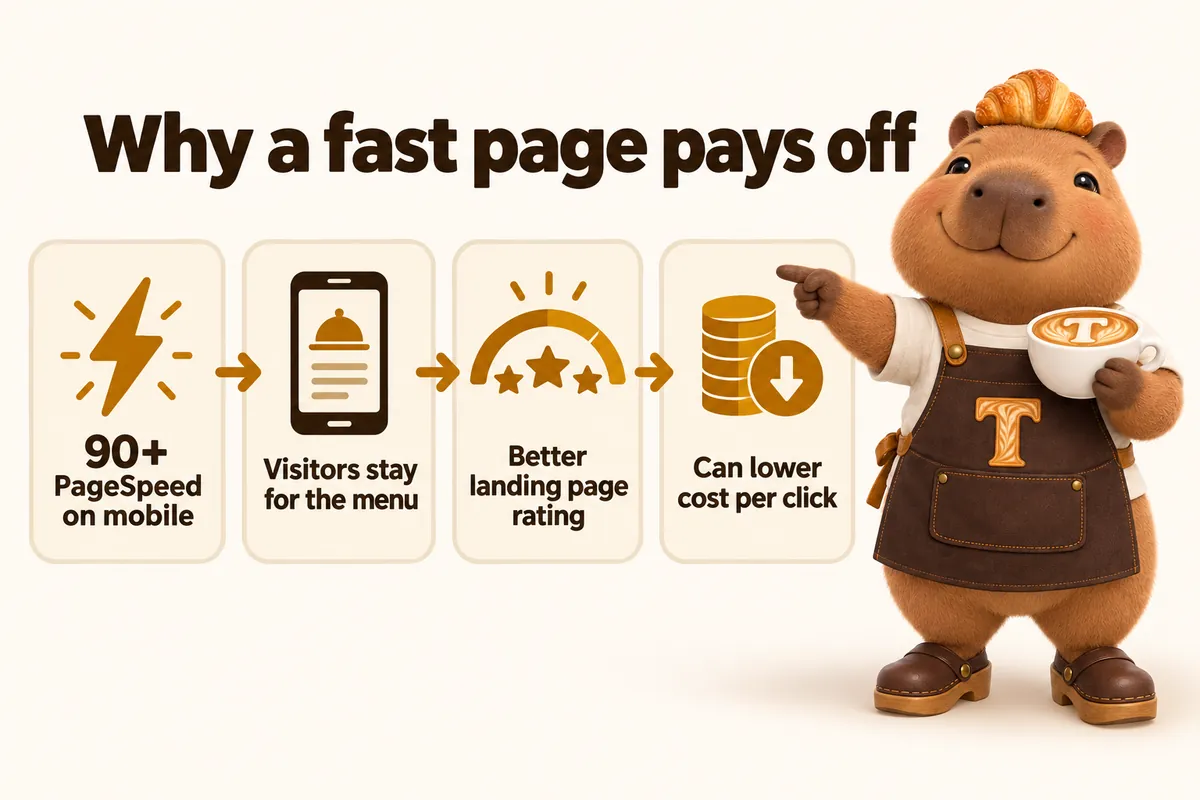
No specific cost per click is promised. Source: Google Ads Help, "About Quality Score for Search campaigns", accessed September 2026.
How will people find your cafe, on Google and in AI answers?
Through four layers of work built into every page: SEO, answer engine optimization (AEO), generative engine optimization (GEO) and structured data. You do not have to learn any of the terms. This is what each one gets you.
SEO: the technical and on-page work
Every page ships with a unique title and description, one clear heading, clean URLs, a sitemap, canonical tags and a real text menu instead of a photo or PDF. Each of your locations, and the neighborhoods or towns you actually serve, can get its own page with its own hours and directions, which is how a cafe starts showing up for local searches rather than only for its own name.
AEO: answers written to be lifted
Answer engine optimization means writing so a search engine or voice assistant can pull a direct answer: FAQ blocks on your key pages, headings phrased the way people ask, and a short direct answer under each one. That is the format that tends to be used for featured snippets and spoken answers.
GEO: being readable for AI assistants
Generative engine optimization is about making it easy for assistants such as ChatGPT, Claude, Perplexity and Google AI Overviews to understand and cite you: consistent business details everywhere, plain factual statements, an llms.txt file that describes the site, and structured data. Nobody can guarantee an AI assistant will mention a business, and we do not. We do the work that makes it more likely.
Schema and JSON-LD
We add structured data matched to each page: your business and locations, services, FAQ pages and breadcrumbs, with reviews marked up only when they are real. Structured data is how search engines read the facts on a page without guessing, and it is what makes a page eligible for richer results.
Our terms include a local search guarantee: if your site has not started ranking for local searches in your area within 3 to 5 months of launch, we keep doing the search work at no additional charge until it does. How cafe local SEO works.
Three plans, shaped like a working day
One monthly fee, plus a $647 build fee invoiced only after launch.
Morning Shift
The website, fully managed
$117/ month
plus $647 one-time build fee, after launch
- The daypart menu switcher
- Custom-coded pages, 90+ PageSpeed
- Weekly management and monitoring
- 5 revisions a month, no size limit
- One free domain and managed hosting
Live in 7 days.
Start with Morning ShiftMost chosen
Full Shift
Everything, plus the AI Engine
$247/ month + usage
plus $647 one-time build fee, after launch
- The daypart menu switcher
- Custom-coded pages, 90+ PageSpeed
- Weekly management and monitoring
- 5 revisions a month, no size limit
- One free domain and managed hosting
- AI receptionist, site chat and text replies, plus usage
Live in 10 days.
Start with Full ShiftOpen to Close
Everything, plus the Content Engine
$597/ month
plus $647 one-time build fee, after launch
- The daypart menu switcher
- Custom-coded pages, 90+ PageSpeed
- Weekly management and monitoring
- 5 revisions a month, no size limit
- One free domain and managed hosting
- AI receptionist, site chat and text replies, plus usage
- The Content Engine: 3 articles, 3 social posts and 2 reels a week
Live in 15 days.
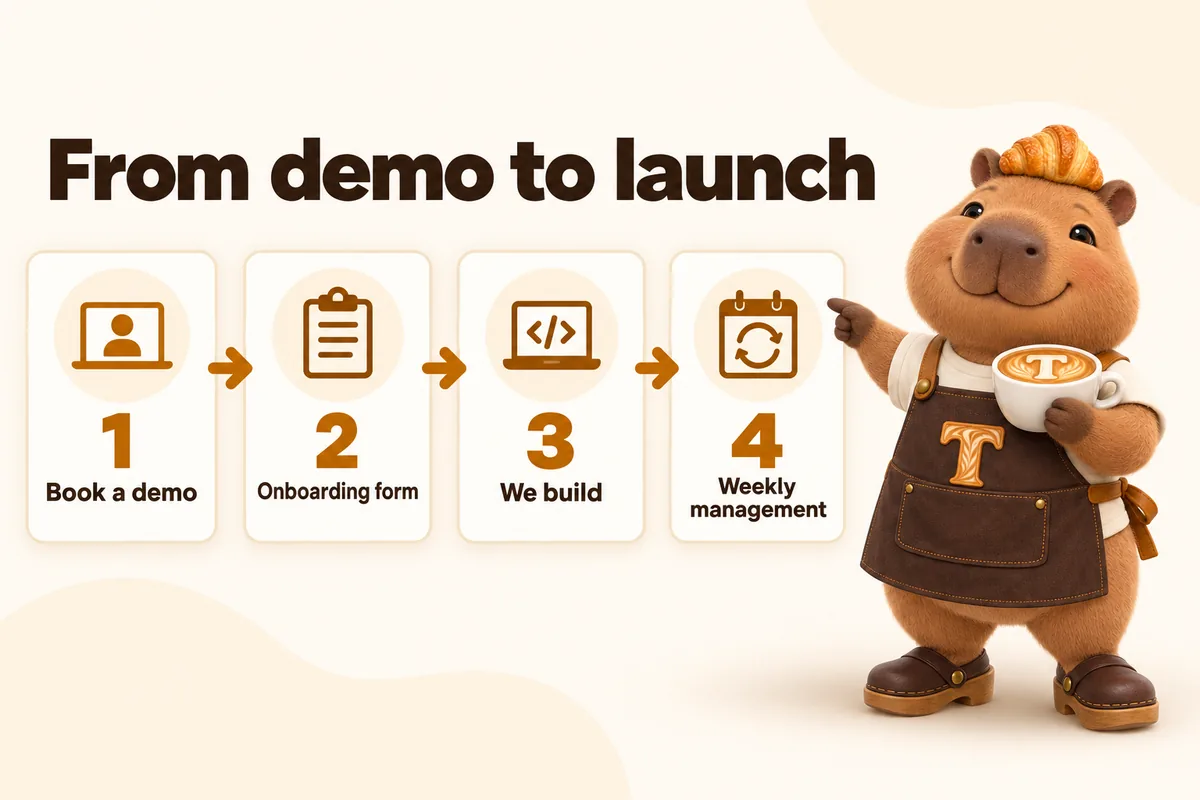
Start with Open to CloseFrom demo to launch, in a straight line
No lengthy discovery phase. The path from here to a live site is four steps.
1
Book a demo
See a build for your kind of counter before you commit to anything.
2
Onboarding form
Menu, hours by daypart, brand and where inquiries should land. About 15 minutes.
3
We build
Live in 7 to 15 days depending on plan, while you keep running the counter.
4
Weekly management
Revisions, articles and monitoring continue every week after launch.
What happens after you order?
Seven steps, in this order, with what you do at each one. Most of them need nothing from you.
- Day 0
You order
You pay the first month of your plan. The $647 build fee is not charged now.
- Same day
Onboarding form, about 15 minutes
Menu, hours by daypart, brand, domain and where inquiries should land. Missing something? Submit anyway and send it later.
- Within days
One onboarding call
We fill any gaps and agree your launch date. The launch clock starts here, not at purchase.
- 7 to 15 days
We build while you run the counter
7 days on Morning Shift, 10 on Full Shift while the AI Engine is set up, 15 on Open to Close with the Content Engine running from day one.
- Before launch
You review and approve
You see the finished site first. Changes before launch are part of the build.
- Launch day
Live, with your client portal
The site goes live and your portal opens. The build fee is invoiced only now that you are satisfied.
- Every week after
Managed, not abandoned
Weekly checks, 5 revisions a month completed within 2 to 5 working days, articles published, AI answers kept current.
What we guarantee, and the fine print in plain words
Four promises from our published terms, with the conditions next to them rather than hidden in them.
No build fee until you approve the site
The $647 build fee is invoiced only after your site is live and you have confirmed you are satisfied with it. If a build does not deliver, that risk sits with us.
90+ PageSpeed, or we fix it
We guarantee a Google PageSpeed score of 90+ on mobile and desktop for the pages we build and host. If a page falls below that because of our work, we fix it at no charge.
Local search work until you rank
If your site has not started ranking for local searches in your area within 3 to 5 months of launch, we continue the search work at no additional charge until it does.
Your domain and your content are yours
The domain is registered in your name and transferred free if you leave. We export your content and articles to you within 14 days of cancelling.
Conditions: neither guarantee covers changes you or third parties make, content published against our advice, or ranking for terms outside your area or services, and neither is a refund; the remedy is the corrective work described. All sales are final apart from a duplicate or incorrect charge. Read the terms and the refund policy.
Built for how your counter actually runs
Eight different shapes of cafe and bakery, each with its own pains, pages and tool.
Specialty coffee shops and roasters
A website for a specialty coffee shop that sells the roast, not just the room
See this buildNeighborhood bakeries
A website for a neighborhood bakery that sells out by 10am and still needs to be found at 6pm
See this buildCafe-bookstores and workspace cafes
A website for a cafe built for staying, not just for ordering
See this buildBagel and breakfast shops
A website for a bagel or breakfast shop that is honest about closing before lunch
See this buildDonut and pastry shops
A website for a donut or pastry shop where the flavor list changes every single day
See this buildDrive-thru coffee stands
A website for a drive-thru coffee stand built for someone searching from behind the wheel
See this buildTea houses and boba cafes
A website for a tea house or boba cafe with a menu too long for a photo
See this buildDessert cafes and patisseries
A website for a dessert cafe or patisserie that leans into an evening crowd
See this buildWhat a season with a managed site sounds like
20 client teams, in their own words: a preorder form that asks the right questions, a page that works on a phone, old links that still land, a fallback for the day a form breaks.
My first check was simple: open the bakery preorders page on a phone and try to get in touch. The essentials are within the first screen, with an obvious way to inquire. Staff can now text a single link mid-call instead of narrating the menu.
They asked to see the questions customers genuinely ask us about bakery preorders, which I respected. Each answer was reviewed by our own staff, so the page sounds like us rather than a copywriter. I now share a link instead of digging through the outbox.
We used to get regular calls asking whether a bakery preorders message had arrived. The acknowledgment explains the next step clearly and tells people how to reach us if something is wrong. A modest change with an outsized effect on our mornings.
The bakery preorders preparation page does one job and does it well. It tells people what to have ready before we speak, without demanding everything up front. We include it in our first response as standard.
The time we spent on the bakery preorders wording was time well spent. It explains what an inquiry achieves and is honest about what still needs a proper discussion. Correcting the site's accidental promises is no longer part of our calls.
Our old bakery preorders routine was a shared inbox and crossed fingers. Ownership is visible now, and cover no longer requires reading someone's entire inbox. Holiday cover stopped being an archaeological exercise.
The old bakery preorders PDF made sense on a printer and nowhere else. Each section has its own link, so answering a question no longer means attaching the whole file. Callers have stopped apologizing for not being able to read it.
They tracked down every place our bakery preorders information appeared; there were more than we admitted. The facts have one home, and every change request names the reference page and its reviewer. Customers no longer quote wording we retired two years ago.
I appreciated being asked to separate new bakery preorders requests from ongoing conversations. The sender picks the route, which means the best-informed person does the sorting. Our inbox finally reads like the conversations it actually contains.
The bakery preorders page used to describe everything and route nothing. The location travels with the inquiry now, so we stop asking people where they meant to reach. Simpler for visitors, and much simpler for whoever covers the phone.
Our old bakery preorders page said all the right things and showed none of them. They helped us select reference material that actually means something and explain it properly. It feels closer to a real conversation with our office than to a brochure.
The after-hours side of bakery preorders was an afterthought on the old site. Evening visitors leave structured information and an honest response time, nothing more promised. Nobody mistakes an automated acknowledgment for an answer, which matters to us.
My sign-off test was to submit the bakery preorders form with every mistake I could invent. Labels stay put, errors explain themselves, and valid answers survive a failed attempt. Abandoned half-completed submissions have become rare.
Years of shared bakery preorders links were my concern, and they treated it as theirs. They inventoried the old addresses and walked us through where each one would redirect. Launching no longer meant abandoning everyone holding an old link.
Requests to change the bakery preorders page used to travel by hallway conversation. Approval and publication both refer to the same recorded version now. The site finally says what we approved, not someone's best guess at it.
Existing customers asking about bakery preorders had no front door of their own. Follow-ups reach the right thread quickly instead of starting a duplicate one. Our inbox is easier to read, and their morning is easier too.
We have only just started collecting this data for bakery preorders, and it has already changed our reviews. It shows which page an inquiry started on, not merely how many people visited. Even the first weeks of data sharpened our discussions.
Our deliberately awkward question was: what if the bakery preorders form breaks? Failure paths were treated as a design requirement rather than an embarrassment. We now know the fallback exists before the day we need it.
The documentation for the bakery preorders pages assumes nothing about the reader. Contacts, change process, post-publication checks: all written down in plain terms. It has already earned its keep during one absence and one staff change.

Six months after launch, a normal Tuesday
The website stops being a job on your list. It becomes the thing that is already right when someone checks.
A regular texts to ask if the pumpkin loaf is back, and the site already says it is, since last Tuesday.
Holiday hours went up the day you sent them, and nobody arrived to a locked door on the 24th.
Catering requests arrive with the date, headcount and pickup time filled in, in the place you actually check.
The phone still rings during the rush, but the routine questions get answered without pulling anyone off the bar.
New articles went out every week you were busy, and a few of the searches that find you now are ones you never thought about.
Is a managed site worth it for a cafe?
Work it out with your own numbers, not ours. The plan pays for itself when the orders the site brings in, or keeps from going elsewhere, are worth more than the monthly fee.
Most cafes can answer this with one question: how many extra catering trays, custom cakes, pre-order boxes or group bookings a month would cover the plan? Put in your average order and see the break-even. Then add the things that are not on a receipt: the hosting, domain and plugin bills that disappear, and the evenings you stop spending on the website.
Where do you build? Anywhere in the US
We build for independent cafes, coffee shops and bakeries in every state, working entirely online. Onboarding, the call and every revision happen online, so where your counter is never changes the timeline or the price. What changes is the local trade the site is written for.
- California from specialty roasters in Los Angeles and the Bay Area to Central Valley bakeries
- Texas kolache and breakfast-taco counters, Austin coffee bars, Houston boba shops
- Florida Cuban cafecito windows, beach-town cafes and year-round tourist trade
- New York bagel shops, bodega-sized espresso bars and neighborhood bakeries
- Illinois Chicago cafes and bakeries that live through a real winter season
- Washington drive-thru espresso stands and the roaster scene around Seattle
- Oregon Portland roasters and cart-style coffee stands
- Georgia Atlanta brunch cafes and suburban bakeries
Your own neighborhoods, towns and delivery areas get their own pages on your site, written for the searches people there actually make. This site has no state pages of its own, on purpose: a page is only worth publishing when it says something real.
Why not a website builder, a freelancer or an agency?
Fair question. Each option below is right for some cafes. Here is the honest version of each comparison.
- GetCafeWebsite vs GoHighLevel funnelsFunnels are built for campaigns; a cafe needs an always-current home base. Many shops are best served by both.Read the comparison
- GetCafeWebsite vs GoHighLevel website builderGood if you or your agency already build in HighLevel; we win when nobody has time to keep the menu and pages current.Read the comparison
- GetCafeWebsite vs GoHighLevel AI StudioAI Studio drafts pages from a prompt fast; we design, write, run and update the site for you every week.Read the comparison
- GetCafeWebsite vs WordPressWordPress gives unlimited control if someone looks after it; we suit shops where nobody has time to.Read the comparison
- GetCafeWebsite vs WixWix is great if you like building it yourself; we fit owners who would rather never open an editor.Read the comparison
- GetCafeWebsite vs SquarespaceSquarespace makes a lovely brochure; a bakery that changes daily needs someone keeping it true.Read the comparison
Design, development, SEO and redesign, all under one roof
Eleven services pages, each written for a different search, not the same page with a keyword swapped.
cafe website design
Cafe website design that switches by daypart: morning menu, afternoon lull, evening close. Live in 7 days, from a monthly plan.
bakery website design
Bakery website design built around a case that sells out mid-morning: daily menu, custom cakes and wholesale, each with its own page.
cafe local SEO
Cafe local SEO through location, hours and daypart pages structured to rank, plus weekly researched articles for your area.
cafe website redesign
Cafe website redesign that keeps your existing search ranking through correct redirects while fixing speed and structure.
Written for your neighborhood, not a keyword list
Guides for cafes, coffee shops and bakeries, researched weekly.
Performance · 11 min
Cafe Website Speed on a Phone: What Actually Makes the Page Slow
The visitor deciding whether to walk in is standing outside on mobile data. What genuinely slows a cafe website down, in order, and what to do about each one.
Operations · 12 minBakery Pre-Orders and Custom Cakes: the Page That Stops the Phone Tag
Most custom order enquiries die in three rounds of messages. The page structure, fields and lead-time rules that let a bakery quote once and move on.
Operations · 11 minCafe Opening Hours That Tell the Truth: Holidays and Sold Out
Hours are the field a cafe website gets wrong most often and most expensively. How to hold them in one place, handle holidays, and be honest about selling out.

See your day, built into a site
A live walk-through of the site you would get, in about 30 minutes. Plans from $117 a month, the $647 build fee invoiced only after launch, live in 7 days.
Book a demo